8-in-1 USB-C Hub: 4K60 HDMI, 10Gbps, 100W PD
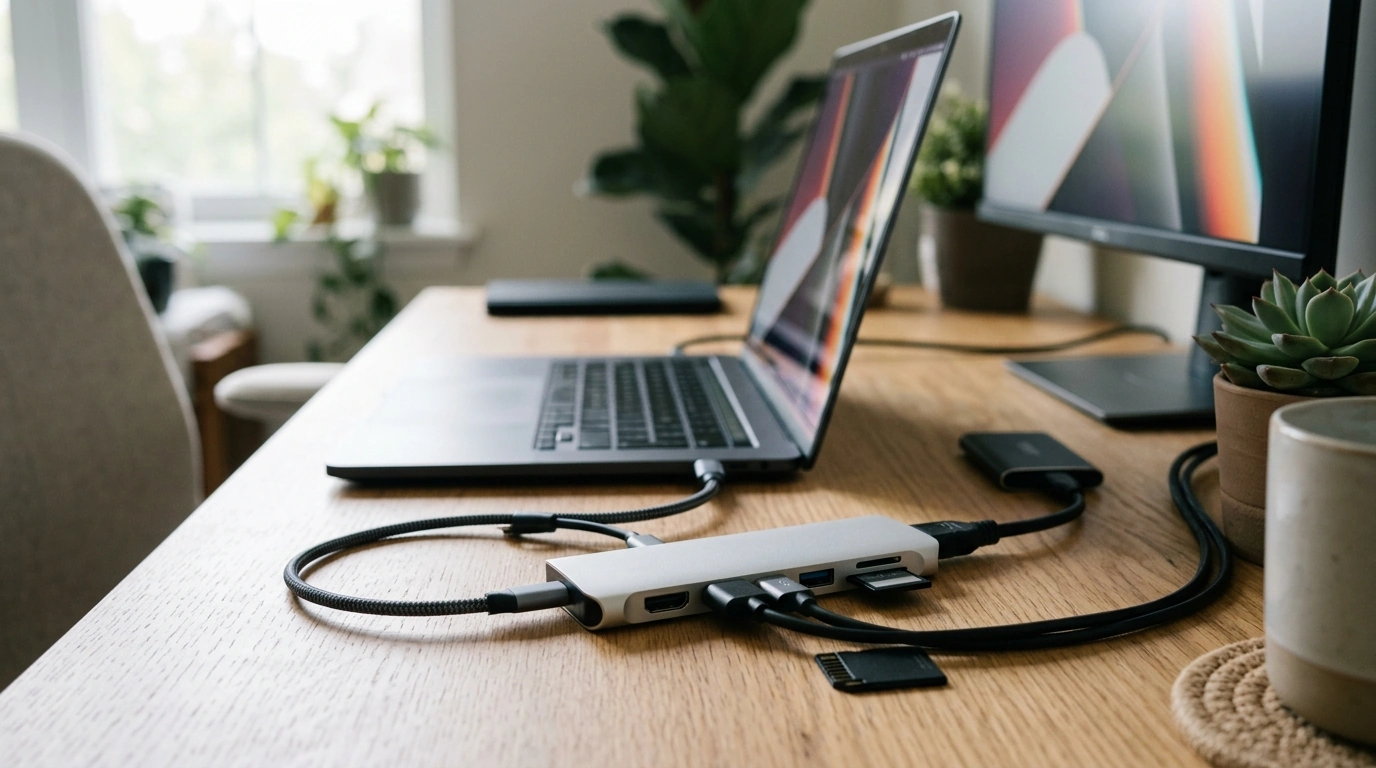
8-in-1 USB-C Hub for One-Cable Setups: 4K60 HDMI, 10Gbps Data, 100W PD, and SD/TF Slots
Laptops and tablets keep getting thinner, but the workday still needs full-size displays, fast storage, and quick access to files on memory cards. Our 8-in-1 USB‑C hub is built for that reality: a single USB‑C connection that adds 4K60Hz HDMI for crisp monitors, up to 10Gbps data for modern drives, pass-through Power Delivery up to 100W, and SD/TF card slots for creators and commuters who move files constantly.
Who this hub is made for
- Desk minimalists who want a clean “one cable to the laptop” setup for power, display, and peripherals.
- Students and remote workers who need HDMI for presentations or a second screen without carrying multiple adapters.
- Content creators who transfer photos and video from SD or microSD (TF) while keeping a fast external SSD connected.
- Travelers using hotel TVs or portable monitors, where a reliable HDMI output matters as much as charging.
Port lineup at a glance
- 8-in-1 expansion from a single USB‑C port, designed to replace a handful of dongles.
- 4K60Hz HDMI for smooth scrolling, clearer text, and cleaner motion than 30Hz outputs.
- Up to 10Gbps data support for faster transfers with compatible ports, cables, and devices.
- Power Delivery pass-through up to 100W to keep the laptop powered while the hub is in use.
- SD and TF (microSD) slots for quick imports and exports without a separate card reader.
What each feature is best for
| Feature | What it enables | Best use case |
|---|---|---|
| 4K60Hz HDMI | High-resolution external display output at 60Hz | Dual-screen desk work, presentations, portable monitors |
| Up to 10Gbps data | High-speed peripheral connection (device-dependent) | External SSDs, fast USB peripherals, large file transfers |
| PD up to 100W | Pass-through charging while connected | All-day laptop use at a desk, charging during meetings |
| SD card slot | Direct access to SD media | Camera workflows, drone footage, photography imports |
| TF (microSD) slot | Direct access to microSD media | Action cams, phones, handheld consoles, dash cams |
4K60Hz HDMI that feels like a real desktop
- 60Hz output helps motion look natural and keeps pointer movement and window dragging from feeling sluggish on compatible displays.
- Great for text-heavy work: clearer scrolling, less “stutter” when moving through documents and web pages.
- For the best results: pair the hub with a display and cable that support 4K at 60Hz, and confirm your laptop/tablet USB‑C port supports video output (DisplayPort Alt Mode or equivalent).
- If your device only supports 4K30, you can still use the hub—display performance will match the host device’s capability.
10Gbps data: the difference shows up in real workflows
- Designed for modern external drives and high-throughput accessories where older hubs can become the bottleneck.
- Useful when juggling large folders: design assets, photo libraries, video proxies, course materials, or backups.
- Real-world speed depends on the host port (USB 3.2 Gen 2 capability), the peripheral, and the cable—matching all three is what unlocks the benefit.
- A practical setup: keep an external SSD connected for active projects, while SD/TF handles imports from cameras or handheld devices.
Power Delivery up to 100W: one cable that keeps up
- Pass-through charging up to 100W is built for laptops that draw significant power under load.
- Ideal for conference-room hopping: plug in once and keep display + accessories running without battery anxiety.
- PD output depends on the charger used and the host device’s negotiated power level; using a higher-wattage USB‑C PD charger helps maintain headroom when peripherals are active.
- Best practice: connect the PD charger to the hub first, then connect the hub to the laptop for the most stable “dock-like” experience.
SD and TF slots: fast access without extra adapters
- Built-in SD and microSD (TF) slots help reduce the usual chain of adapters for media imports.
- Helpful for quick-turn editing: ingest files, offload to an SSD, then keep working on the external display.
- Great for on-the-go review: pull images or footage directly from a card while charging the laptop and presenting to a larger screen.
- Tip for smoother file handling: copy files to local or external SSD storage before editing directly, especially for large video projects.
Compatibility and setup checklist
Everyday setups this hub fits
Shop our picks
- 8-in-1 USB-C Hub with 4K60Hz HDMI, 10Gbps Data, PD 100W, SD/TF Card Slots
- How to Ask AI for Help: Smart Ways to Ask AI for Help – A Digital Guide for Effective AI Interaction
Helpful specs (authoritative references)
- USB Power Delivery specification documents (USB-IF)
- USB 3.2 specification overview (USB-IF)
- HDMI specification overview (HDMI Licensing Administrator)
FAQ
Will this hub output 4K at 60Hz on any laptop with USB-C?
No—your USB‑C port must support video output (such as DisplayPort Alt Mode), and your display and HDMI cable must also support 4K at 60Hz. If any part of the chain is limited, the output may fall back to 4K30 or a lower resolution/refresh rate.
Does 100W Power Delivery mean the laptop always receives 100W?
No—Power Delivery is negotiated between your charger, the hub, and your laptop, and the final wattage depends on what each supports. To maximize available power, use a properly rated USB‑C PD charger and cable, and keep in mind the hub and attached peripherals may draw some power.
Can SD and TF (microSD) be used at the same time?
It depends on the hub’s internal card-reader controller behavior—some setups allow access to both, while others may prioritize one slot at a time. For smoother workflow and data safety, keep transfers organized and always eject cards properly before removing them.











Leave a comment